Withdrawal Button for Magento 2 – legally compliant & free of charge
Starting June 2026, legally required: Our Magento module integrates the withdrawal button in compliance with the law and free of charge.
You can find the module here on GitHub
What is the Withdrawal Function about?
From June 19, 2026, EU online shops (B2C) must offer a digital withdrawal feature. The withdrawal must be as simple as the contract formation (in accordance with § 356a BGB / EU-Directive 2023/2673).
This Magento 2 module meets the requirements: customers withdraw orders with a few clicks, directly in their account or via guest form.

Legal requirements & implementation
- Visibility: Clearly labeled button (e.g., “Withdraw order”), always available.
- Simplicity: Form asks only for necessary data (name, order number, email). No hurdles, no mandatory login.
- Confirmation: Instant acknowledgment by email after submission.
Note: The module does not replace a legally compliant withdrawal instruction (terms and conditions). We recommend a legal review of your texts.
Features for your customers
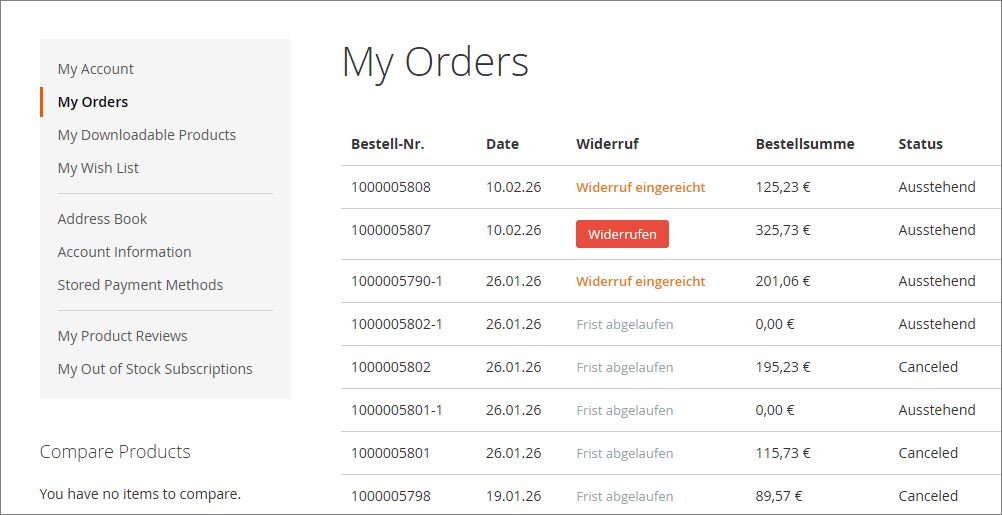
1. Withdrawal button in the order overview
Under My Account > My Orders and on the order detail page, customers see immediately:
- Status “Deadline expired”
- Withdrawal link (as long as the deadline is running)
- Status “Withdrawal submitted”
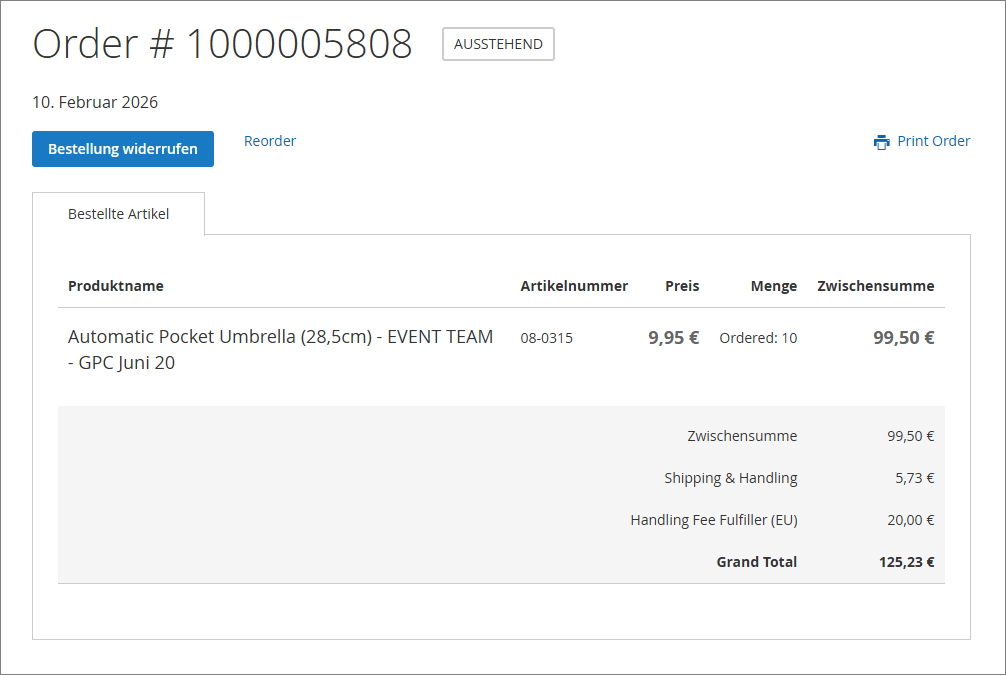
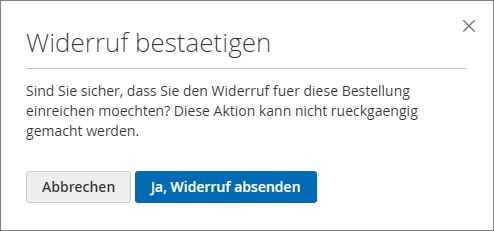
2. Withdraw an order
Additionally, on the order detail page a “Withdraw order” button is displayed.
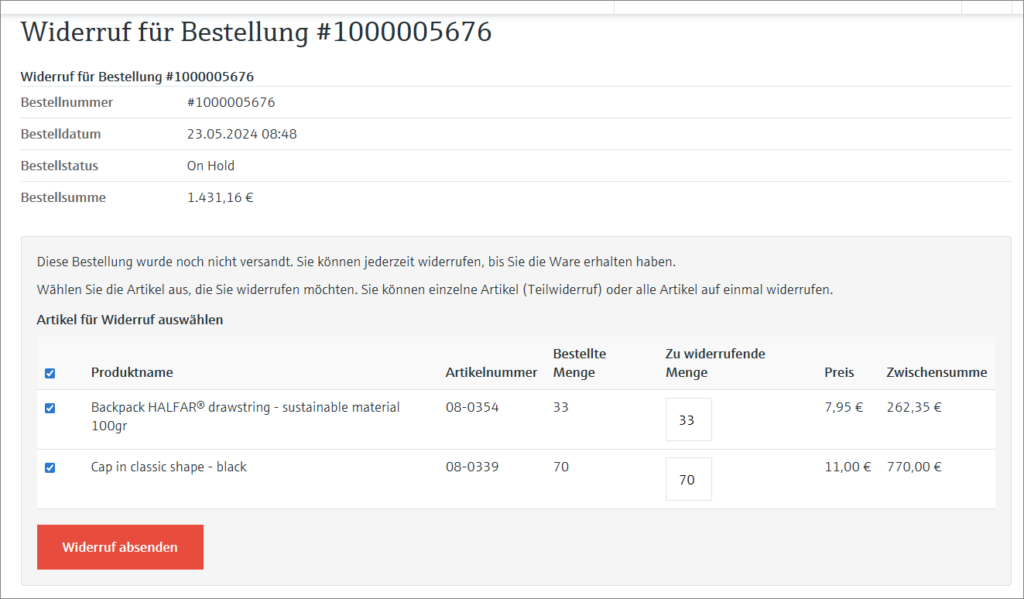
3. Withdrawal detail page
Before the actual withdrawal, the customer sees a summary of their order.
4. Partial withdrawal
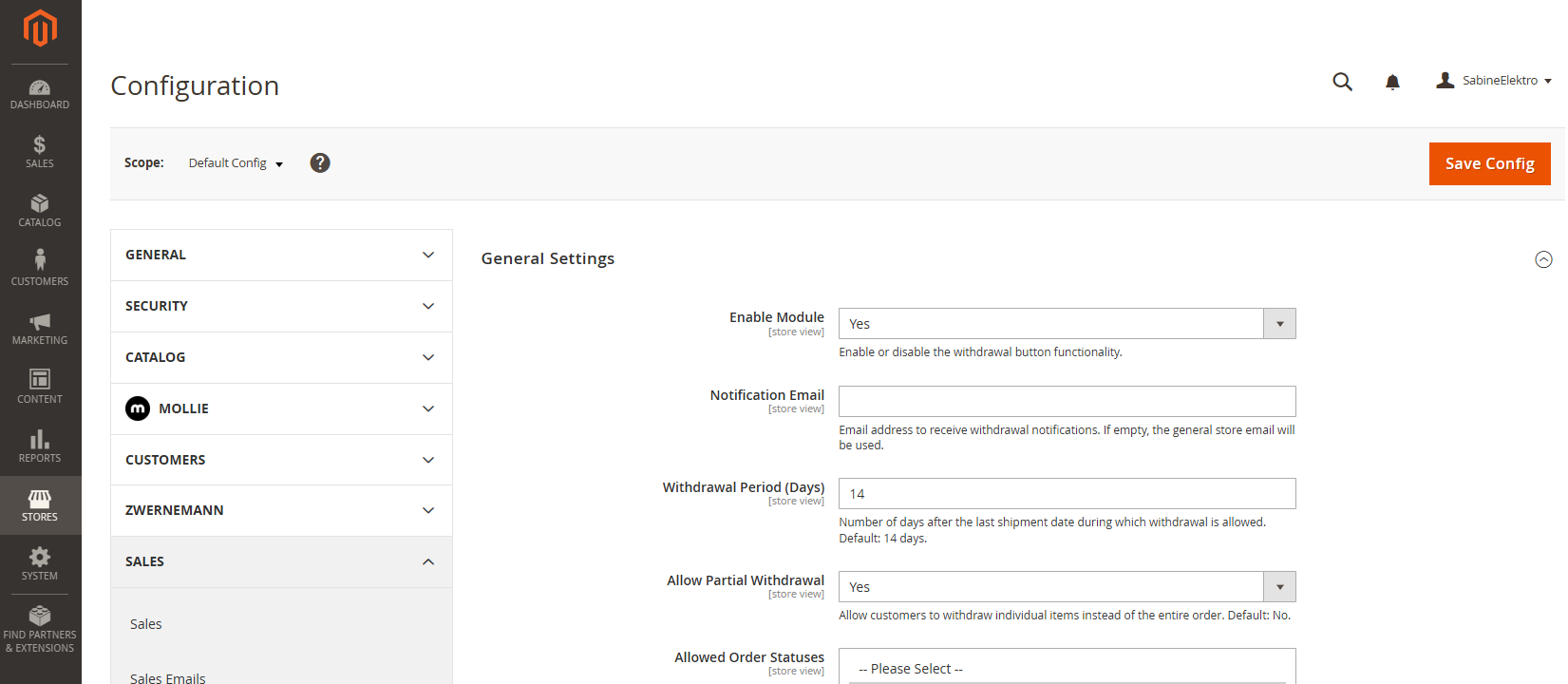
Customers can select individual items and quantities when submitting a withdrawal request. The module allows for partial withdrawal of the order, provided this option is selected in the backend. Customers will then receive an email notification listing the canceled items.
5. Guest orders
Customers who ordered without an account can access withdrawal through a dedicated search form. Order number and email are enough to locate the order and initiate withdrawal. Available at: /withdrawal/guest/search
6. Confirmation page
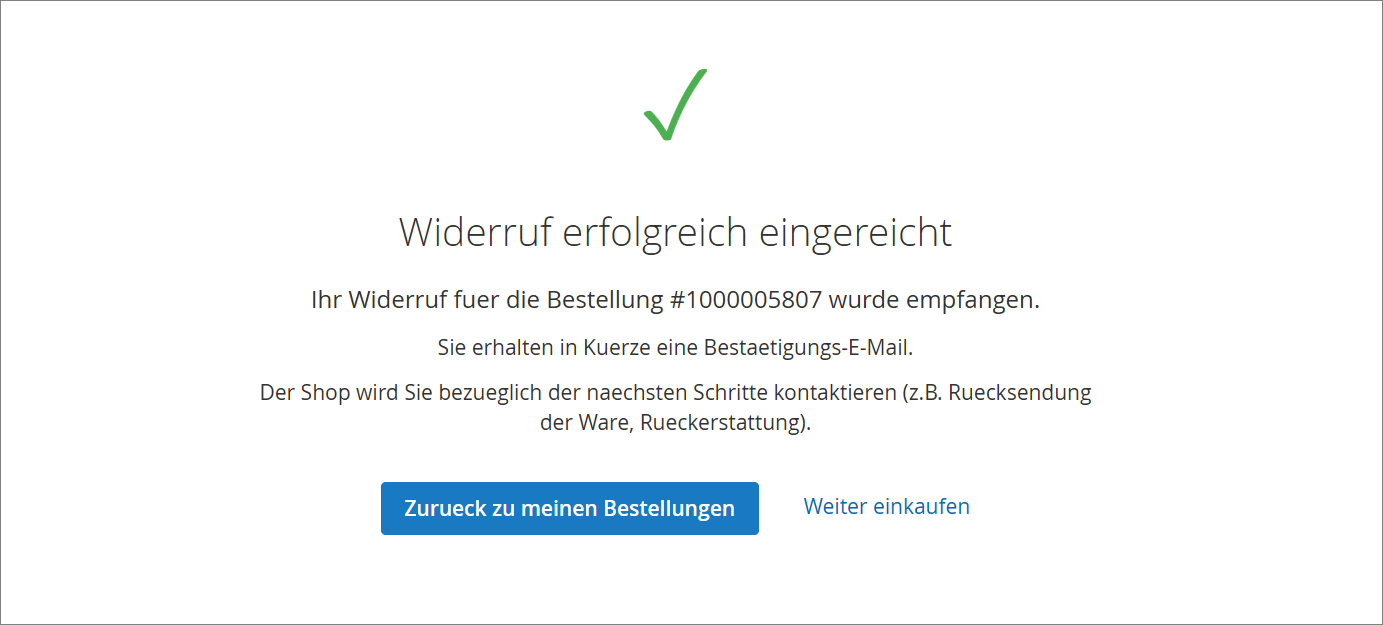
After submission, the customer is directed to a success page. It confirms that the withdrawal has been received and an email is on its way.
For you as shop operator
1. Admin overview of all withdrawals
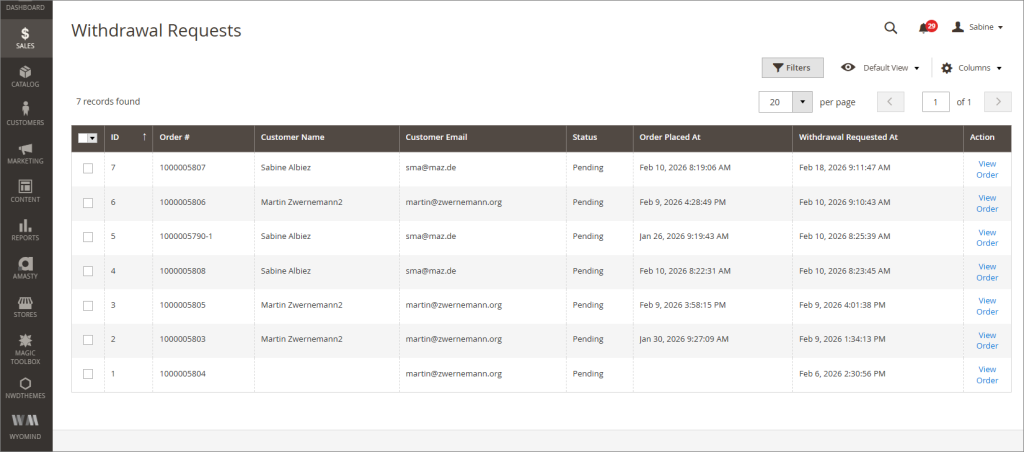
Under Sales > Withdrawals you’ll find a tabular overview of all withdrawals:
- ID, order number, customer name, email
- Status (Pending / Confirmed / Rejected)
- Order date and withdrawal date
- Direct link to the respective order view
2. Change the status of the withdrawal
As soon as a withdrawal is received, two emails are sent:
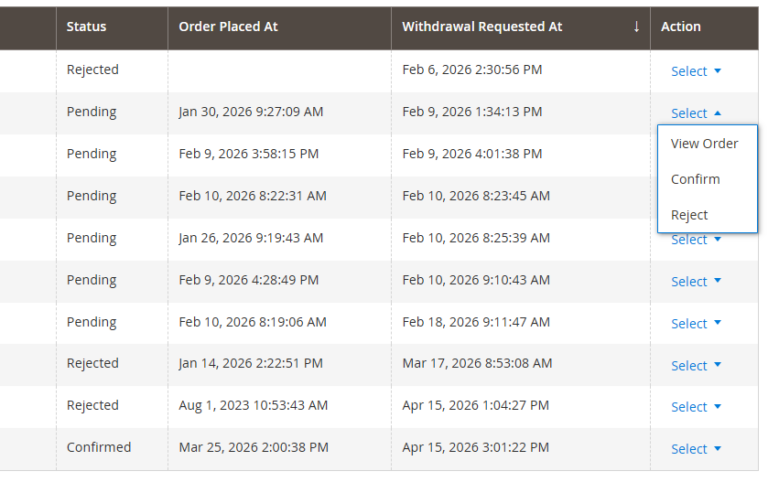
- Click on the desired withdrawal request
- Select the new status from the dropdown:
pending, confirmed, rejected
3. Automatic email notification
As soon as a withdrawal is received, two emails are sent:
- To the customer: confirmation with order details
- To you: notification with all relevant data
You also receive a BCC copy of the customer email. Email templates can be customized in Admin.

4. Note in the order
Each withdrawal is automatically added as a comment in the order history. Thus it is immediately visible in the order view that a withdrawal exists.
5. Configurable
Admin panel Stores > Configuration > Sales > Withdrawal Settings:
6. Hyvä Theme
The Module Withdrawal button for Magento 2 can also be used with the Hyvä theme.
7. Languages
The module now supports all 24 official languages of the European Union. All translations use the legally correct term for the statutory right of withdrawal in accordance with the EU Consumer Rights Directive (2011/83/EU). The available languages are: Bulgarian, Danish, Estonian, Finnish, French, Greek, Irish, Italian, Croatian, Latvian, Lithuanian, Maltese, Dutch, Polish, Portuguese, Romanian, Swedish, Slovak, Slovenian, Spanish, Czech, Hungarian.
REST API
Withdrawal entries can also be retrieved programmatically:
GET /rest/V1/zwernemann/withdrawalsAccess is protected by ACL permission(Zwernemann_Withdrawal::withdrawals).
Multilingual
Fully translated in German and English (96 strings). Additional languages can be added via custom CSV files.
GitHub & Community
The module for Magento 2 is free and open source. GitHub: Zwernemann/magento2-withdrawl.
Benefits:
- No licensing fees.
- Full transparency in the source code.
- Community support via GitHub Issues.
System requirements
| Component | Version |
|---|---|
| Magento 2 Open Source | 2.4.6 to 2.4.8-p4 |
| PHP | 7.4 or higher |
Installation
Via ZIP-file
Unpack to app/code/Zwernemann/Withdrawal/and run Magento setup commands.
Per Composer
composer require zwernemann/module-withdrawal
php bin/magento setup:upgrade
php bin/magento setup:di:compile
php bin/magento setup:static-content:deploy de_DE en_US
php bin/magento cache:flush
Setup
- Navigate to: Stores > Configuration > Sales > Withdrawal Settings
- Activate module.
- Configure email addresses and withdrawal period.
- Clear cache.
Link guest order form
The guest order search form is located at:
https://www.ihr-shop.de/withdrawal/guest/searchAdd this link, for example, here:
- In your shop footer
- In order confirmation emails
- On your withdrawal information page
With Magento URL rewrites you can adjust the address as needed, e.g. to /withdrawal.
Installation & Setup Support
On request, we support you with the complete installation and configuration of the Withdrawal Button module.
Contact & Support
Zwernemann Medienentwicklung
79730 Murg
If you have questions, problems, or ideas for new features — feel free to reach out.
License
OSL-3.0
FAQs Withdrawal Button
Starting in June 2026, online retailers must place a clearly visible Withdrawal button on their websites. This button allows customers to cancel orders easily and without complications.
- Clear labeling: The button must be clearly identifiable as a revocation or withdrawal declaration.
- Compliance with deadlines: The revocation must take place within the legally prescribed period (usually 14 days, depending on the legal situation).
- Transparent information: Customers must receive all relevant information about the right of withdrawal, return procedures, and possible costs.
- Verifiable documentation: The revocation must be clearly recorded and documented.
- Legal obligation: From June 2026, the Withdrawal button is mandatory.
- Improved compliance: Clear communication reduces legal risks and misunderstandings.
- User-friendliness: Customers can withdraw quickly and easily, increasing customer satisfaction.
The revocation button must allow customers to declare their withdrawal directly on the website. As soon as the button is clicked, the relevant withdrawal information and form must be displayed.
Yes. The backend setting “Partial Withdrawal” allows customers to cancel individual items within an order (default: No). By default, a full withdrawal is applied.
The Withdrawal button for Magento 2 module provided by Zwernemann Medienentwicklung integrates seamlessly into the Magento 2 backend and offers all legally required features.
The Module Withdrawal button for Magento 2 can also be used with the Hyvä theme.
The Withdrawal button for Magento 2 module provided by Zwernemann Medienentwicklung is free of charge and legally compliant.
The module supports all 24 official languages of the European Union. All translations use the legally correct term for the statutory right of withdrawal in accordance with the EU Consumer Rights Directive (2011/83/EU).
Contact us for professional implementation of Withdrawal button for Magento 2 – precise and reliable.