Run your existing Crystal Reports inside Salesforce
With CRGenerator-LWC from Zwernemann Medienentwicklung
Keep the reports your business already runs on. Salesforce supplies the data, the PDF comes out of the same process your users are already in.
When a template engine is not enough
Some business documents are more than fields dropped into a layout. A calibration certificate carries measurement series, tolerance bands and deviation curves. An inspection certificate pulls values from half a dozen places and calculates the rest. A production report groups, subtotals and breaks across pages depending on how much data there is.
Crystal Reports has been doing this kind of work for decades. Nested report structures, running totals, subreports, conditional formatting, charts, dynamic page layouts. That is its home ground, which is why so many of these documents were built there in the first place.
In Salesforce projects there has usually been a gap between those reports and the data. Either the reports were rebuilt from scratch, or a separate reporting server was kept running alongside Salesforce to produce them.
CRGenerator-LWC closes that gap. Your existing .rpt files run directly in Salesforce. The report definition stays exactly as it is, Salesforce provides the data, and the result is a PDF inside the Salesforce process.
Reports are rarely part of the plan, and often the hardest part of the move
In a Salesforce project, the reporting estate is seldom the first topic on the table. Objects, processes and screens get designed, tested and signed off. Then, a few weeks before go live, somebody asks how the inspection certificates are going to be produced from now on.
At that point the answer is usually uncomfortable. The estate is rarely small, and rarely simple. Reports have been added and adjusted over many years, and by now they do a lot more than arrange fields on a page. Much of the business logic lives inside them.
There is a second problem underneath the first. Most document generation and reporting tools cover only part of what Crystal Reports can do. So the task is not only to rebuild a report. It is to reproduce logic that grew over a decade, in a tool that may not have the same building blocks.
The approach
CRGenerator-LWC runs your existing Crystal Reports inside Salesforce. The .rpt file remains the report definition, Salesforce supplies the data, and the PDF is created within the Salesforce process.
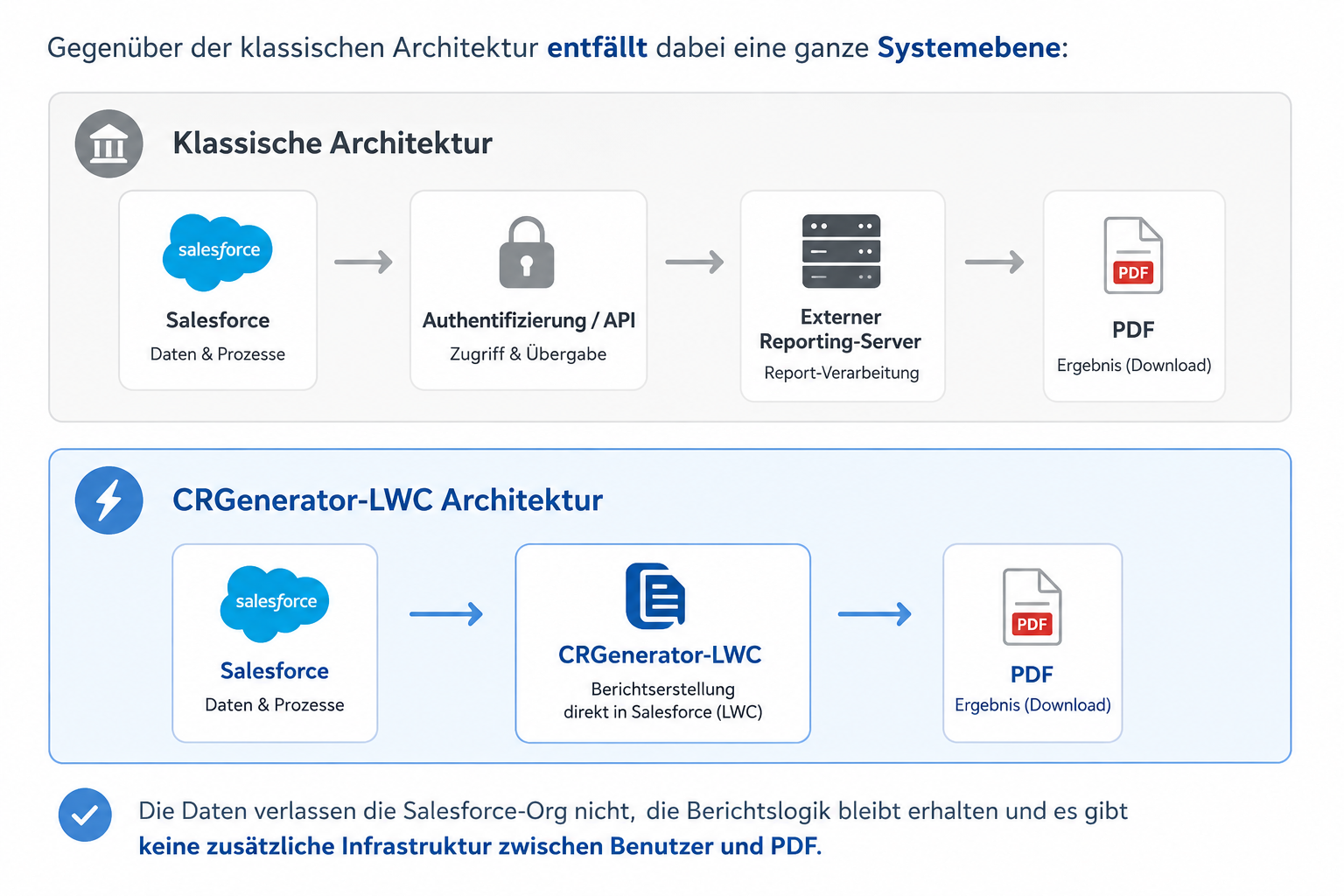
Several integration tasks disappear at the same time:
- no external reporting server
- no additional runtime infrastructure
- no report data sent to third party systems
- no API round trip to get the result back
- no separate user and permission management
- no extra operating and maintenance processes
Formulas, groupings, subreports and layouts stay part of the original report definition and are executed directly against Salesforce data.
The mapping
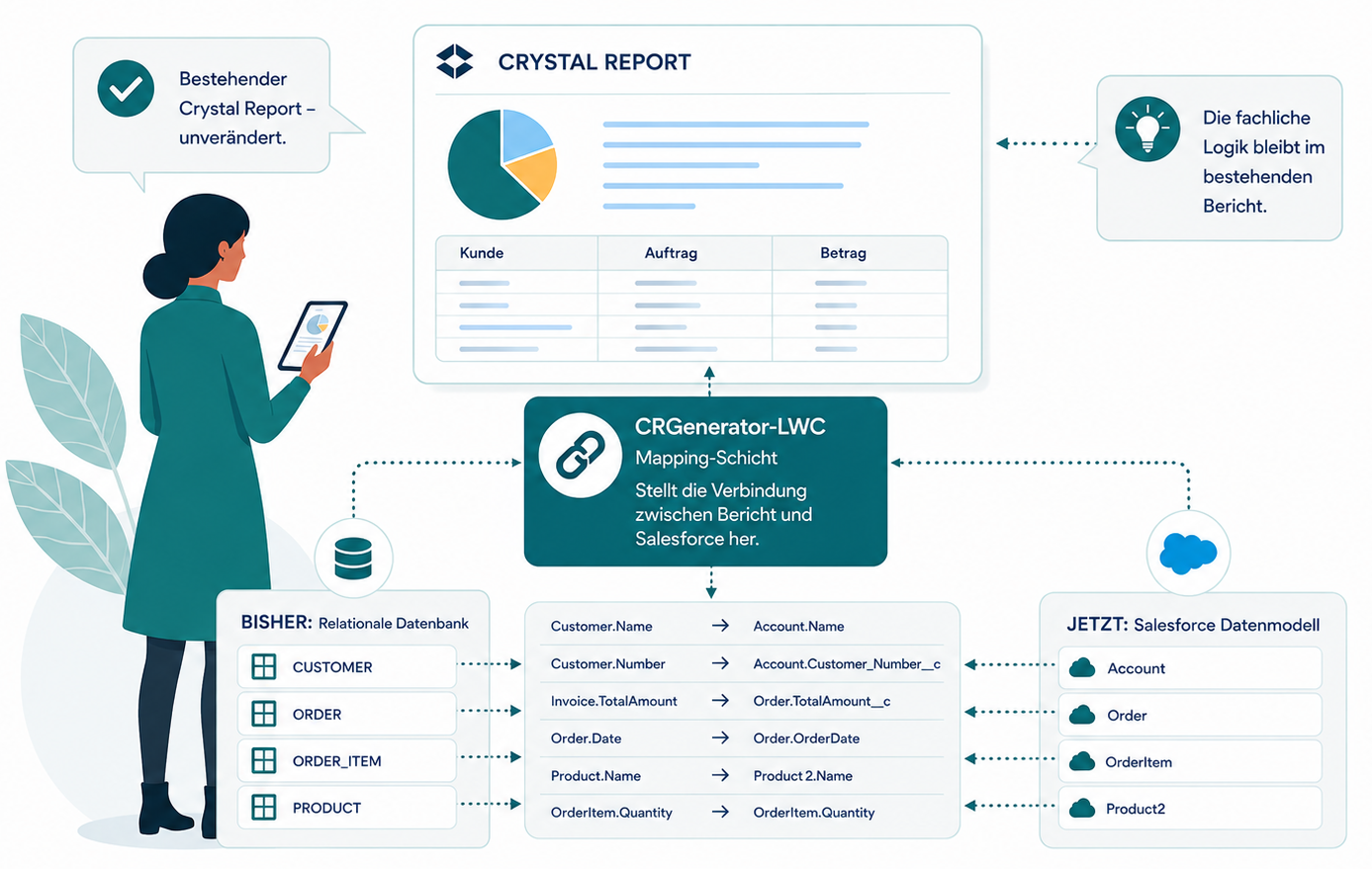
A Crystal Report was written against a relational data model. It knows structures like CUSTOMER, ORDER and ORDER_ITEM. In Salesforce the same information is called Account, Order and OrderItem. Connecting the two happens outside the report logic:
Customer.Name → Account.Name
Customer.Number → Account.CustomerNumber_c
Invoice.TotalAmount → Order.TotalAmount_c
The important part is that this list does not have to be guessed. A .rpt file contains a description of its own data source, which is to say the tables, fields and joins the report actually uses. That description is read out and connected line by line to Salesforce objects and fields, in a mapping tool that shows you the list instead of asking you to maintain it in a configuration file.
Two things follow from that, and they are what make the business case calculable.
Effort per report depends on field count, not on report complexity. Formulas, groupings and layout are not part of the mapping at all, because they stay inside the report.
Reports on the same data model share their mapping. Thirty inspection certificates from one family are mapped once, not thirty times.
Where it is used
Industrial and mechanical engineering
Inspection certificates, technical documentation and production reports.
Calibration and metrology
Calibration certificates with measurement series, tolerance bands and deviation curves.
Medical technology
Quality documentation, test reports and regulatory evidence.
Laboratories
Measurement reports, lab protocols and analysis results.
Quality assurance
Documents with heavy calculation, multi level grouping and large tables.
Water and environmental technology
Measurement protocols, analyses and documentary evidence.

How a Crystal Reports estate gets to Salesforce
1. We look at your actual reports
Whether your estate can be taken over with CRGenerator-LWC is established up front, on the real files. You send the .rpt files. That is enough for a technical analysis, and nothing else is needed at this stage.
You get back an assessment of the estate: how large it really is, which data models are involved, where the special cases sit, which mappings can be shared, and what the takeover is likely to cost in effort.
2. CRGenerator-LWC is deployed in your org
The Crystal Reports files are stored in Salesforce and remain what they always were: the definitions the PDFs are generated from.
3. The mapping is set up once per data model
From that point your existing reports run against Salesforce data. New reports can be added at any time, and a report built on a data model that is already mapped inherits the mapping instead of starting a new one.
What is supported
- the complete formula library
- Crystal syntax
- Basic syntax
- multi level grouping
- running totals
- subtotals
- subreports
- parameter links
- shared variables
- conditional formatting
- record selection
- record sorting
- charts
- embedded graphics
- multi column layouts
- text wrapping with real font metrics
- page breaks
- dynamic layouts
What we check first
Crystal Reports has been growing for decades, and no honest supplier can promise every quirk of every version sight unseen. The following are looked at case by case:
Im Einzelfall analysiert werden insbesondere:
- User Function Libraries. UFLs are supported. Your specific library is analyzed beforehand.
- Export formats other than PDF.
- Embedded metafile graphics from older reports.
- Very old reports with constructions that made sense at the time and have been carried forward ever since.
Everyday production functionality is covered. The exceptions are identified and assessed before the project starts, not discovered halfway through it.
Under the hood
A .rpt file is not XML. It is a binary container in OLE2 format holding several streams, each of them encrypted and compressed, with the report itself stored as a sequence of typed records. CRGenerator-LWC works through that structure in five steps. It opens the container. It decrypts the streams, which means implementing the Rijndael variant Crystal uses, with different keys for the report definition and the data source description. It decompresses. It decodes the records and builds the report definition and the formula trees from them. Then it executes the report and paginates it on the paper format stored in the report’s own printer settings.
Subreports are not separate files. They are complete reports held in their own storage areas inside the same .rpt file, and they are read by the same code. In one of the certificates the engine was developed against, practically the entire content sits in 31 of them.
Three claims you can check rather than take on trust
Completeness.
The goal was never a parser that runs without crashing. It was that every record in the RPT file is fully interpreted. The proof is a report that is read in, written back out, and comes out byte identical to the original. Anything that had not been properly understood would be lost on the way.
Formula language.
All 525 functions of the Crystal function library are implemented, in both dialects: Crystal syntax and the Basic syntax that most people call VBA formulas.
Platform neutrality.
No eval, no new Function, no DOM, no Canvas, no browser or server specific objects. The XML reader is written from scratch, and text is measured with real font metrics. An automated check runs over every source file on every change and fails the build the moment any of those appear. That discipline is the reason the engine loads at all under the Salesforce Content Security Policy, and it is why a formula is evaluated as a syntax tree instead of being translated into JavaScript.
Fundamentals
Since CRGenerator has its own engine, it does not require any DLLs, runtimes, or SAP licenses to run the reports.
Not to run your reports. There is no runtime to install and no reporting server to keep alive. If you want to keep editing reports in the original designer, that stays as it is today.
No. The .rpt file remains the report definition. What changes is where the data comes from.
It stays inside the report. Formulas, groupings, subreports and layout are not touched by the mapping, which is why report complexity does not drive the effort.
Technology and Salesforce
It opens the OLE2 container, decrypts and decompresses the streams, decodes the typed records into a report definition and formula trees, then executes and paginates the report. See the technical section above for the detail.
Real .rpt files, in their binary form. No export step, no conversion, no intermediate format to keep in sync.
Report rendering happens in the Lightning Web Component, not in Apex. Apex is used to retrieve the data the report needs, so the usual Apex CPU limits do not sit in the middle of a long report.
No. There is no external render service in this model and no transfer of report data to a third party.
That depends on the report and on the volume of data behind it, and it is measured on your own reports during the inventory analysis rather than promised in advance.
It uses none of them, and the build fails if any of them appear in the source. Salesforce enforces a Content Security Policy that rules out dynamic code execution, so an engine that compiles formulas to JavaScript cannot run there at all.
In your org. They stay the report definitions the PDFs are generated from.
Migration and effort
The .rpt file describes its own data source. That description is read out and connected field by field to Salesforce objects and fields in a mapping tool.
The number of fields. Formulas, groupings and layout are not part of the mapping.
Less than the number suggests, because reports built on the same data model share a mapping. Most large estates turn out to be a handful of data models with many documents on top of them, and the inventory analysis tells you how many.
The .rpt files. You get back an assessment of scope, data models, special cases, shared mappings and expected takeover effort.
There is no reporting server to run and no separate reporting platform to license per user. Commercial terms are agreed per project and are part of what you get back from the inventory analysis.
Yes, at any time. A report on a data model that is already mapped uses the existing mapping.
Scope and limits
All 525 functions of the Crystal function library, in both syntaxes, along with grouping, running totals, subreports, parameter links, shared variables, conditional formatting, record selection and sorting, charts, embedded graphics, multi column layouts and dynamic page layouts.
Yes, including reports where most of the content lives in them. One certificate used during development holds practically everything in 31 subreports.
Yes. Both dialects are implemented.
UFLs are supported. Your specific library is analyzed before the project starts.
Text is measured with real font metrics and the report is paginated on the paper format held in its own printer settings, which is what makes output comparable page for page. Your own reports are compared against their originals during the analysis.
Both are looked at case by case. Send the files and you get a straight answer before anything is committed.